Trace points Haven at one matter from your own life: a dispute, a consulting engagement, a project, a period. It gathers every message and file tied to it across the accounts you connect, then turns it into a Trace Dossier someone else can read: a summary, a dated chronology, and every item as a numbered exhibit.
In beta for Haven members · only ever pointed at accounts you connect · signed on your computer
A landlord keeps a deposit. A client questions an invoice. An insurer wants proof. An auditor asks what happened on a project three years ago. The answer is in your mail and files — contracts, invoices, threads, attachments — scattered across thousands of messages and more than one account.
Putting it in order by hand takes days. Trace does the gathering, then hands you a document you can send to a lawyer, an accountant, an insurer or a client, with a signature that shows nothing was changed after it left your computer.
Four steps — from a plain-language description to a signed document you can hand on.
Type what you’re after — a period, project, person, or topic — and add any names, addresses, or phrases that matter.
Haven reads across the accounts you’ve connected and gathers every related item — not just keyword matches, but things connected by context.
A plain-language summary, then every item found, marked by how strongly it relates. Ask it questions — “when did we sign?” — with answers cited to the message.
Export a Trace Dossier: what was searched, a summary, a dated chronology and every item as a numbered exhibit, with a signed manifest anyone can check.
Describe the matter the way you’d say it, choose which accounts and time window to search, and pick how deep to go. Before anything runs, Haven shows an honest estimate of the work involved.
Trace only searches accounts you’ve connected. Nearly all of the work happens on this device; only small, redacted excerpts of genuinely ambiguous items are checked off-device — and every one of those is listed in your Network Activity log.
Haven leads with what it found, then lists every item with its date, where it lives and how strongly it relates. Note the third row — found by context alone, in a thread that never names the project. Ordinary search can’t do that.
Haven found 41 items tied to your Meridian consulting engagement, from the signed agreement in January to the last invoice in December. Two change requests altered the scope in June, and the final payment was discussed in a thread that never names the project.
Results store each item’s details, never the message body. The export re-reads what it quotes from the provider when you make it.
Export turns a finished Trace into a Word document: a statement of what was searched and what wasn’t, a summary, a dated chronology, and every item as a numbered exhibit, followed by how the document was produced.
Pick a template to set the framing — general, renting, work, freelance, an insurance claim or family arrangements. Choose whether to quote full messages, include attachments, and black out card and Social Security numbers.
Haven saves it as one folder with a signed .manifest.json. Whoever receives it can check it in their browser and confirm nothing was changed.
Gmail, Outlook and Google Drive, January to December 2021, for Meridian Advisory, 1099 and keith@meridian.example. iMessage was not searched.
41 items, numbered, each with its date, sender, source and text.
Illustrative. Opening the document in Word and saving it changes its fingerprint, so keep a clean copy of what you send.
Trace surfaces the thread that refers to a project obliquely and never uses its name — because it works from what you described, not from string matching. It runs on the same three-tier inference Haven already uses everywhere else: patterns and an on-device classifier first, with a narrow second-opinion tier for the genuinely ambiguous cases.
The manifest holds a fingerprint of the document and of every exhibit and file, signed on your computer. Whoever you send it to can confirm nothing was altered at havenprotect.app/verify, or with the small script published there. Once you’re done, you can also archive or trash the matter’s messages in one pass (Gmail today), with 30 days to undo.
“What was my tax bill for 2022?” — once a Trace finishes, ask it directly. Haven re-reads the most relevant items transiently and answers with citations back to the exact messages the answer came from. Nothing is stored; your mailbox stays the only copy, and if the answer isn’t there, Haven says so instead of guessing.
Every provider search a Trace runs and every model check it makes lands in your Logging tab, verbatim, as it happens. There is no hidden step — the record of what left your machine is the mechanism, not a promise.
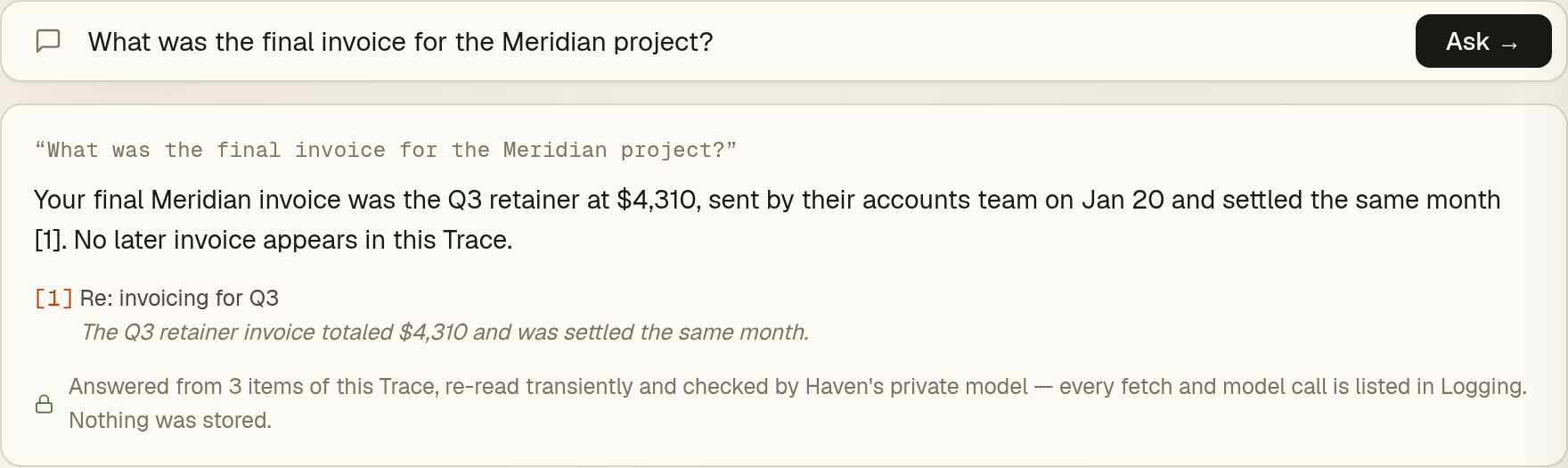
A finished Trace isn’t just a list — it’s something you can interrogate. Ask in plain language — “what was the final invoice?”, “when did we sign?” — and Haven picks the most relevant items, re-reads them transiently, and answers with citations back to the exact messages the answer came from, each one a click away.
Nothing is stored to make this work: your mailbox stays the only copy. The checking happens as short, redacted excerpts on GPU infrastructure Haven operates end to end — never retained, never trained on — and every fetch and model call is listed in your Logging tab as it happens. If the answer isn’t in what was checked, Haven says exactly that instead of guessing.
Trace is live for Haven beta members: describe-it-in-your-words search, contextual Deep search, asking questions of your results, and the signed Trace Dossier. One record is $59, or unlimited with membership.
Only your connected accounts · on-device first · signed on your computer